How To Change Your Subscription
This guide provides a straightforward process for changing your subscription plan on PodUp, ensuring you can easily navigate the options available. It outlines two methods for accessing your subscription settings and details how to view both annual and monthly pricing. By following these steps, you'll gain the flexibility to choose a plan that best suits your needs without any hassle.
1. Navigate to https://app.podup.com/home
There are 2 ways to change your subscription plan

2. 1. Click the orange "Monetize Plan" or the plan option that appears just below your name
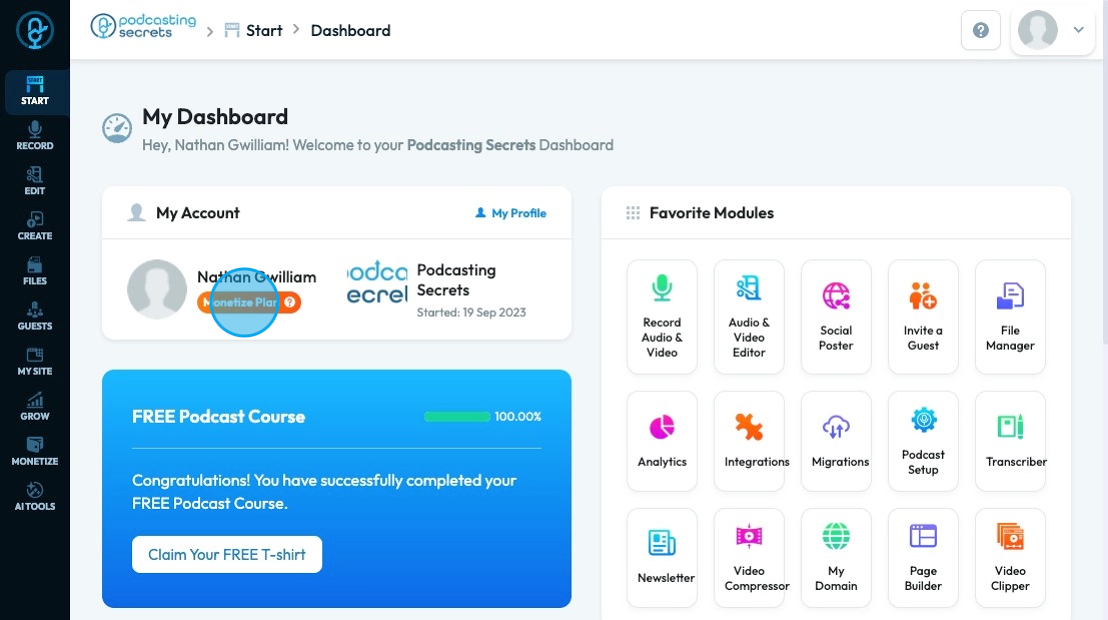
3. 2. Click the profile icon in the top right corner

4. Click "My Subscription"

5. A popup will appear with the 3 main packages at the annual rate. If you want to see just pay month by month select the "Monthly" package
6. To view all the plans, select "click here"
7. The "Click here" link will bring you to this page where you can view all the pricing options that PodUp offers
Related Articles
How long can a creator pause their subscription for?
This guide is essential for creators on PodUp, as it outlines the specific terms for pausing subscriptions, including duration and financial implications. Understanding these details helps creators manage their production schedules effectively while ...How can I see what is included in my subscription?
This guide provides a straightforward method to check your subscription details on PodUp, ensuring you understand your plan and its services. 1. Navigate to https://app.podup.com/home 2. Click on your "Profile". 3. Right under your "Account Name" you ...What happens to my website when I end my PodUp subscription?
This guide is essential for anyone using PodUp, as it outlines the critical steps and consequences of ending your subscription. It emphasizes the importance of backing up your content to avoid permanent loss, details the timeline for content ...How to change account settings?
This guide shows you how to update your PodUp account settings so your profile stays current and reflects your personal information. 1. Navigate to https://app.podup.com/home 2. Click your "Profile" icon in the top-right corner 3. Select "Edit My ...How to change my homepage
Use this guide to change your PodUp homepage and improve your site’s experience 1. Navigate to https://app.podup.com/home 2. Click "My Site" 3. Select "Page Builder" 4. All your website “Pages” will open 5. Click the "3 Dots" button of the page you ...