How Do I Publish My Page
By following this guide, you can quickly make your content live and accessible to your audience.
1. Navigate to https://app.podup.com/home

2. Click "My Site"

3. Select "Page Builder"

4. This section displays all your pages

5. To publish a page click on the "3 Dots"

6. Select "Edit"

7. Scroll down and click "Published"
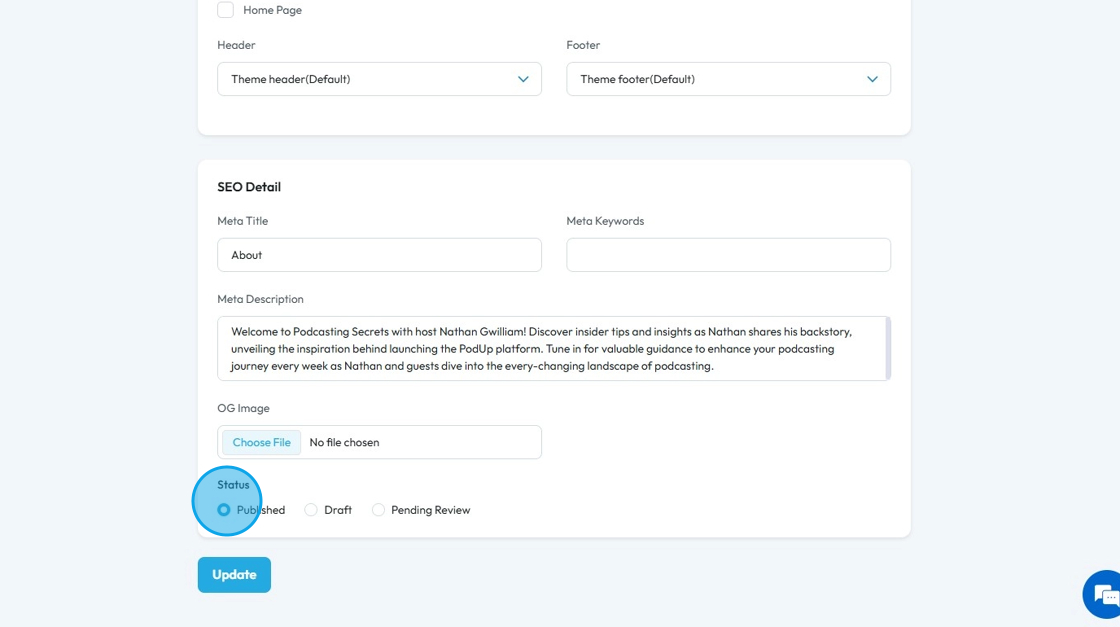
8. Click ‘Update’ and your page will be published on the website

Related Articles
How to Publish a Blog
Easily publish your blog with clear steps and tips for a smooth experience 1. Navigate to https://app.podup.com/home 2. Click "Create" 3. Select "Blogs" 4. Click "Create Post" 5. The "Create Post" page will open. Enter the required details for your ...How to Publish a Video Podcast
Easily publish your video podcast with this guide—covering creation, SEO, and social media distribution 1. Navigate to https://app.podup.com/home 2. Click "Create" 3. Select "Video Episodes" 4. The "Video Episodes" page will open 5. Click "Create ...How to Publish an Audio Podcast
Easily publish your audio podcast—covering episode creation, SEO, and social media distribution. 1. Navigate to https://app.podup.com/home 2. Click "Create" 3. Select "Podcast Episodes" 4. The "Podcast Episodes" page will open 5. Click "Create ...How to Publish a Social Media Post?
Easily publish and schedule social posts with PodUp to grow your presence across platforms 1. Navigate to https://app.podup.com/home 2. Click "Create" 3. Select "Social Poster" 4. You will be directed to the "Social Poster" page 5. Click "Create New ...How do I publish a video clip
Easily publish video clips to social media with PodUp to boost engagement and grow your presence 1. Navigate to https://app.podup.com/home 2. Click "Create" 3. Select "Social Poster" 4. Click "Create new post" 5. You will be directed to the "Publish ...